Volleyball: Spike Evolved! Controls & Beginner Guide
Master Volleyball: Spike Evolved! on PC, console, or mobile by learning core receive, set (Q / L2), jump-spike (Space + Left-Click), dive, and block controls, following the Three-Touch System, and enabling Advanced Mode for precise court aiming.
Interactive Platform Controls Reference
Switch between PC Keyboard/Mouse, Console Controller, and Mobile Touch HUD layouts.
Standard Roblox PC layout for action volleyball mechanics. Enable Advanced Mode in settings for crosshair aim precision.
| Action | Input | Court Timing Tip |
|---|---|---|
| Move | W A S D | Position your feet cleanly under incoming serves before touching the ball. |
| Sprint | Shift | Close distance quickly across court seams without burning a dive. |
| Receive / Bump (Touch 1) | Left-Click (LMB) / E | Tap cleanly on ball contact to pop Touch 1 toward center net for the setter. |
| Set (Touch 2) | Q (or Space + Q) | Delivers a clean arc to your wing attacker; avoid crowding the setter if you did Touch 1. |
| Jump | Spacebar | Time your jump so you meet the set ball at peak vertical height. |
| Spike (Touch 3) | Spacebar + Left-Click | Aim toward open corners or sharp cross-court lanes with Advanced Mode active. |
| Block | Right-Click (RMB) / Net Jump | Stand near the net and match the opposing spiker's upward swing rather than jumping early. |
| Dive (Emergency Save) | Ctrl (or WASD + Shift) | Reserve strictly for fast low shots outside normal running reach. |
| Active Ability / Skill | F / Y (Active Slot) | Trigger during high-pressure rallies or late-set match points. |
No control binding matches that search term.
Gamepad mapping for Roblox console players. Pair with camera sensitivity tuning so quick cross-court tracking stays smooth.
| Action | Input | Court Timing Tip |
|---|---|---|
| Move | Left Stick | Keep fluid footwork in back-row seams before committing to a jump. |
| Receive / Bump (Touch 1) | R2 / RT | Tap smoothly as the ball arrives to control rebound height. |
| Set (Touch 2) | L2 / LT | Feeds clean second-touch sets toward your outside or opposite hitter. |
| Jump | A / Cross (X) | Wait for the set to crest before starting your upward leap. |
| Spike (Touch 3) | Jump + R2 / RT | Direct your stick toward open baseline corners while airborne. |
| Block | L2 / Circle (Timed Net Jump) | Watch the rival spiker's arm wind-up at the net before jumping. |
| Dive (Emergency Save) | L1 / LB | Use only to keep fast kill-shots alive when walking cannot reach the ball. |
| Active Ability / Skill | X / Square / L3 | Check your bottom HUD slot icon to confirm the active skill bind on your controller. |
No control binding matches that search term.
Touchscreen layout for iOS and Android Roblox clients. Landscape orientation gives the widest view of cross-court angles.
| Action | Input | Court Timing Tip |
|---|---|---|
| Move | Left Virtual Joystick | Track ball shadows early so your thumb stays free for right-side action buttons. |
| Receive / Bump (Touch 1) | On-Screen Bump Button | Tap once as the ball enters your receive circle; avoid frantic double-taps. |
| Set (Touch 2) | On-Screen Set Button | Position near the front-center zone to feed clean arches to wing spikers. |
| Jump & Spike (Touch 3) | Jump Arrow + Spike Button | Tap Jump first, wait for apex elevation, then tap Spike to slam downward. |
| Block | Net Positioning + Jump Button | Face the attacker close to the tape and jump right as they swing. |
| Dive (Emergency Save) | On-Screen Dive Button | Save for low corner shots so you do not get stuck in recovery animation. |
| Active Ability / Skill | Bottom HUD Ability Button | Tap when your rally meter or cooldown indicator shows ready. |
No control binding matches that search term.
 | |
| Supported Inputs | PC Keyboard & Mouse, Console Controller, Mobile Touch |
|---|---|
| Core Rally Rule | Three-Touch System (Receive -> Set -> Spike) |
| Recommended Setting | Enable Advanced Mode once comfortable with basics |
| Best Practice Mode | Solo Story AI matches |
Controls & Court Fundamentals
Use the interactive platform tabs above to switch between PC, Console, and Mobile inputs and search for any specific court action. Always check the in-game settings menu after major weekend Beta patches for custom keybind updates.
The Three-Touch System Explained
Every consistent rally in Volleyball: Spike Evolved! follows the classic volleyball Three-Touch System. Teams and solo players who respect all three touches control ball height, deny free points, and create clean hitting windows even against aggressive Ranked squads or Coliseum bosses.
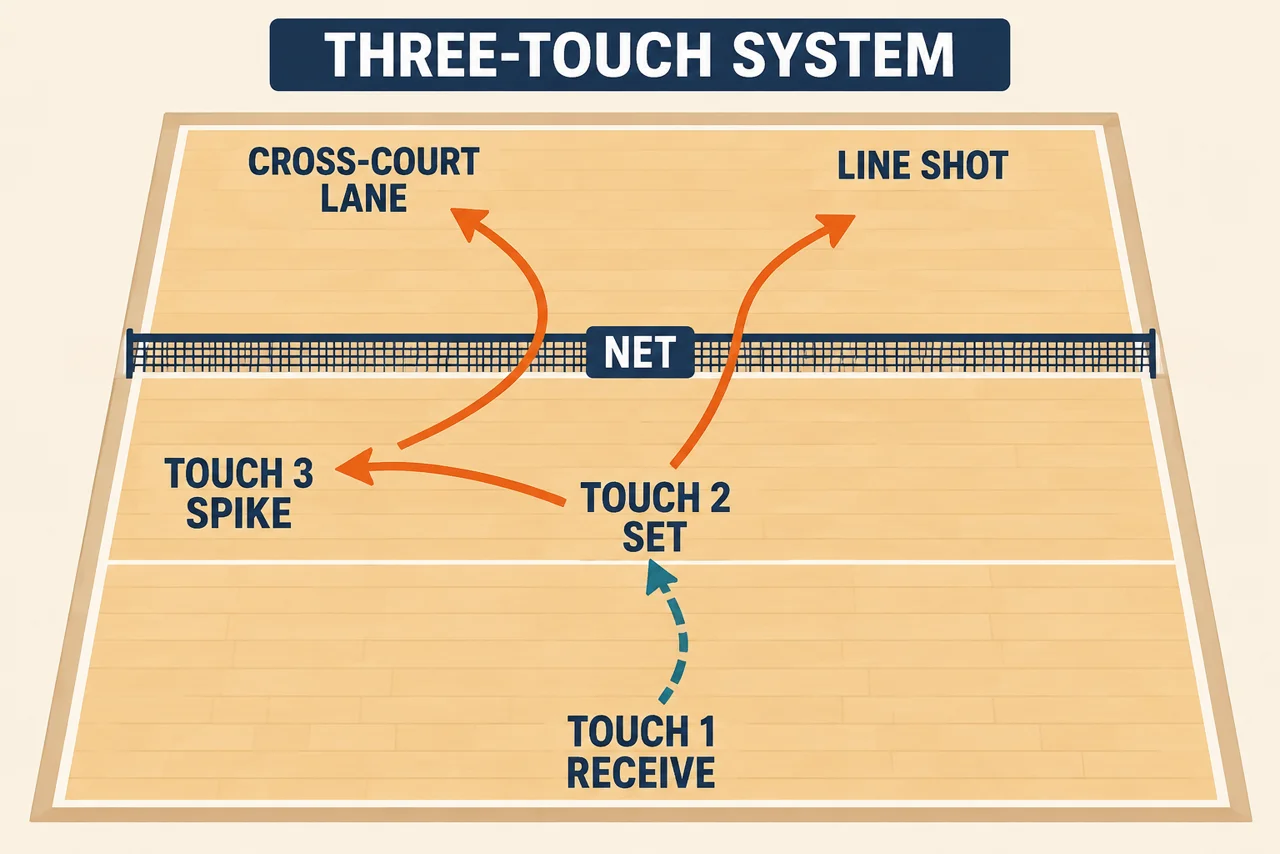
- Touch 1 — Receive (Bump / Lift): Position your feet under the serve or incoming spike before making contact, then tap your receive input cleanly to send a controllable arc toward center court near the net.
- Touch 2 — Set (Tempo Feed): The setter takes the second touch (
Qon PC,L2on console, or the on-screen Set button on mobile) to deliver either a high outside arc or a quick attack set depending on where opposing blockers stand. - Touch 3 — Spike (Finish): Time your approach and press Jump (
Space/A/ Jump Arrow) so your spiker meets the ball at peak height, then trigger your swing to drive the ball sharply cross-court or down the sideline.
Serving, Jump Timing & Advanced Mode
Because Volleyball: Spike Evolved! draws inspiration from The Spike Cross, raw timing matters far more than rapid clicking. Practice these core mechanics inside Solo Story before queuing for Ranked matches:
- Standing Serve vs. Jump Serve: Stand cleanly behind the service baseline, watch the toss arc, and tap your receive/serve input for a safe standing serve while learning. Once comfortable, toss forward, sprint into your approach, press Jump (
Space/A), and swing at peak height for a faster jump serve aimed toward an open back-row seam. - Peak-Height Spiking: Jumping too early causes your arm swing to clip the top tape of the net. Watch the ball's descent arc after Touch 2, start your step-in as it peaks, and trigger the strike right at maximum jump elevation.
- Enabling Advanced Mode & Manual Aiming: Open the in-game Settings menu and toggle Advanced Mode. While standard controls automate part of your hit trajectory, Advanced Mode unlocks manual power-bar and directional aim control—letting you drop soft receives to trap hard serves, aim deep baseline corners, and steer cross-court angles around tall blockers.
- Confirming Custom Binds In-Game: Standard community layouts map PC movement and actions to
WASD,Space,Q,LMB,RMB, andCtrl/Shift(and console controllers toLeft Stick,A/Cross,RT/R2,LT/L2,LB/L1), but because keybinds can be customized inside Settings and refined across weekend Beta patches, confirm your active ability bind in the lobby HUD before Ranked sets. - Net Blocking Without Jumping Early: Stand close to the net directly across from the enemy spiker. Watch their jump animation rather than the ball alone—press block right as they rise toward contact so your arms seal the lane at maximum height.
- Dive & Recovery Discipline: Diving saves low, fast balls outside normal running reach, but it adds a brief recovery pause on the floor. Use directional footwork (
WASD/ stick) whenever you can reach a pass standing up.
Equipping Traits & Triggering Active Abilities
Your character runs a 3+1 Court Loadout made up of three passive trait slots (bottom-left HUD) and one manual active ability slot (bottom-center cooldown bar). After redeeming Lucky Spin codes from our Active Codes Ledger and rolling in the Spin menu, equip your preferred passives and active skill in the loadout menu—see our Builds & Traits Planner for S-tier trait pairings. During a match, wait until the bottom-center active meter finishes charging, then press your assigned active key (F / Y on PC or your controller HUD icon) to turn momentum on tight set points.
Playing with Friends, Match Formats & Ranked
Volleyball: Spike Evolved! supports up to 25 players per server, allowing friends to join the same public or private Roblox lobby via the server browser or Roblox Friends list and queue into 1v1, 2v2, 3v3, or 6v6 courts:
- 1v1 & 2v2: Demands balanced all-around stats (Power, Jump, Speed, and Stamina) since each player covers half or all of the court.
- 3v3 & 6v6: Rewards dedicated court roles—assign one player to anchor Touch 2 sets, one front-row Middle Blocker to time net blocks, and wing attackers to finish Touch 3 spikes.
- Ranked Matchmaking: Climb the global Ranked ladder by cutting out unforced receive errors, staying in your assigned lane instead of chasing Touch 2 away from the setter, and keeping a reliable stamina-balanced loadout ready.
Ranked Ladder & Early Progression Checklist
New players often jump straight from the tutorial into Ranked matches and get punished by upgraded kits. Running through this short checklist puts your account on even footing right away:
| Stage | Target Mode | Core Objective | Next Guide |
|---|---|---|---|
| 1. Starter Setup | Lobby HUD | Redeem active Lucky Spin, Gem & Event Token codes plus Roblox Group present | Active Codes Ledger |
| 2. Mechanics Drill | Solo Story | Master Three-Touch spacing, jump apex timing, and Advanced Mode aim | Controls Table Above |
| 3. Kit & Trait Lock | Spin & Upgrade Menu | Roll a role-fit trait and invest Gems into Power, Jump, Speed & Stamina | Builds & Traits Planner |
| 4. PvE Stress Test | Coliseum | Read telegraphed spikes, time net blocks, and win long rallies without panic diving | Coliseum Boss Guide |
| 5. Competitive Climb | Ranked | Minimize unforced receive errors and rotate cleanly with 2v2 / 3v3 teammates | Beta Update Log |
Beginner Gameplay & Controls Walkthrough Video
If you want to see basic court movement, jump timing, and the in-game code redemption interface in motion before stepping into your first lobby, watch the gameplay walkthrough below:
Frequently Asked Questions
What are the PC keyboard controls for Volleyball: Spike Evolved?
On PC, use W/A/S/D to move, Left-Click (or E) to receive/bump, Q to set, Spacebar to jump, Spacebar + Left-Click to spike mid-air, Right-Click or timed net jump to block, Ctrl (or Shift + movement) to dive, and your assigned ability key for active skills. Check the in-game settings kiosk if you customize binds.
Should you turn on Advanced Mode in Volleyball: Spike Evolved?
Advanced Mode is a settings toggle that gives you sharper directional aim control over how far and at what angle your sets and spikes travel, making it much easier to hit around Coliseum and Ranked blockers.
Why do my spikes keep hitting the net in Volleyball: Spike Evolved?
Time your jump so your character reaches peak height just as the set ball reaches your hitting window, then press your attack input cleanly. Jumping too early drops you below the net tape and causes net faults or weak hits.
Can you play Volleyball: Spike Evolved! on mobile?
Yes. Volleyball: Spike Evolved! supports Roblox touch controls on mobile with a left virtual joystick and dedicated on-screen Bump, Set, Dive, Jump, and Spike buttons.
Sources & References
- Volleyball: Spike Evolved! Official Roblox Experience — Official Roblox Place 73956715002927 gameplay overview and cross-platform support
- 4 New Codes & How to Play Spike Evolved Roblox (Berlian kecil on YouTube) — Real beginner gameplay walkthrough covering basic controls and code redemption
Player Notes (0)
Leave a comment (0 comments)